


This week, I am going to do something a little different and tell you about some work I’ve been doing using the coding capabilities of large language models. Over the past year, I’ve been experimenting with creating software for my own personal use, vibe coding around nine simple applications, and I’ve been blown away by what I’ve been able to make.
These models are incredibly capable and getting more capable all the time. Almost everyone reading this will have fully adapted to what Ben Thompson calls the first paradigm of AI, “the ChatGPT era” (which I define as being an active chatbot user as a replacement for Google searching), but I suspect most of you have not fully adapted to the second paradigm, “the reasoning era,” in which I include automated coding. As Ben describes it:
Reasoning entails an explosion in chain-of-thought tokens, and different models need different amounts of reasoning tokens to arrive at the right answer.
For those of you who have been following the progress in LLMs and coding wrappers and harnesses, the following will be no surprise, but I hope some of the details and results will jog a new idea or two for you. Also, I suspect many of you are having a similar experience to mine. We read an article or see a video almost every day that claims another new and massive breakthrough in artificial intelligence, and we feel a tinge of panic or inadequacy in our own AI usage. Agentic workflows can automate all of your work! Some agent or model you’ve never heard of before has solved a long-standing mathematics problem! People are running entire small companies using only an AI model!
For me, the cure for rising anxiety is almost always to put my head down and do some work, and with that in mind, let me show you what I’ve created. I’ll focus on the four simple applications that are related to making my personal investing a bit easier.
You can make your own software now
Over the past year or so, I have used Claude Code and, to a lesser extent, Codex to create at least nine rudimentary applications to help me with my work and personal life:1
an application to search, display, and download corporate filings from the SEC’s EDGAR database,
an application to search the names of investment firms and display their current holdings through their 13F forms,
a portfolio tracker that unifies holdings in a few different investment accounts,
an investment ideas tracker,
a customized calendar and task manager,
a dieting and meal-planning application,
a landing page for my personal website,
a financial calculator,
three different mortgage amortization and refinancing calculators (these were early experiments).
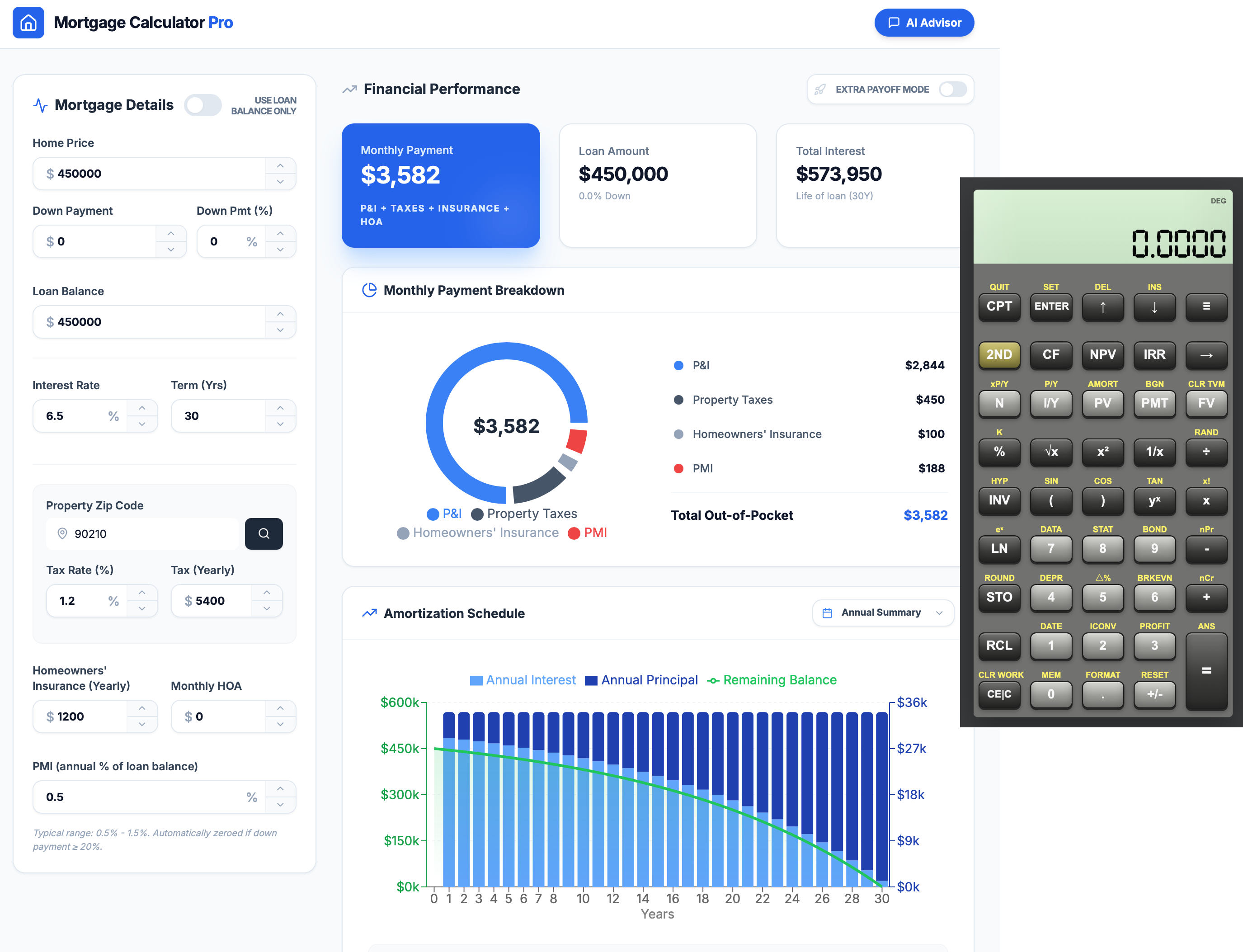
Some of these, like the mortgage calculators, were pure experiments that I no longer use, some, like the meal-planning application, are still being developed, and some, like the four investing applications, I am using every day or every week and continuing to add features here and there. I’ve been amazed at the capabilities of the models to quickly and easily generate applications that I’m getting so much use from. The biggest takeaway I’ve had from all of my experimenting is that it is now possible for someone with little technical ability to create personalized software for themselves.
I should say here that I am a reasonably “technical” person, but I don’t have any formal training in software engineering. If you divided the world up into professional (or formally trained) software engineers and non-professionals, I would guess I’d be in the upper five percent of the laypeople.
That being said, the LLMs dramatically shrink the gulf between not knowing how to code and being able to produce software. Without LLMs, I would only have been able to create the web applications listed above with many months (years?) of coursework first. The models have definitively opened up software creation to every educated person with no formal software engineering training. What’s more, for anyone feeling doubtful about that statement or about their own abilities, the solution resides in these tools themselves; if you don’t know how to start, ask the LLMs themselves how to. You will find step-by-step instructions for any level of understanding, in a way textbooks or online videos cannot replicate.
Why build your own applications?
Why did I feel the need to create my own software? After all, nothing I described in the list of nine applications above is new or revolutionary; there are probably several off-the-shelf options for each of them. In Apple’s App Store, for example, a search for “financial calculator” brings up five to ten decent options and many more depending on what features or design appeals to you most.
Yes, there are some applications that are so generic and so well-designed that I don’t need my own. But there are three instances in which I do want my own solution:
when I am looking for a very specific use case to support my own workflow,
when existing free applications are bloated by advertising or their paid counterparts cost too much, or
when existing applications are poorly designed.
Take my first example above: an application to search the SEC’s EDGAR database. The existing solutions are a case in which all three apply.
The SEC’s EDGAR interface is poorly designed
I’ll quickly explain what’s wrong with the existing solution here. The SEC’s website, while a good effort, hardly behaves in the way any reasonable end user would want.
First off, there are, to my count, three separate landing pages one can find if one searches for something like “EDGAR database”. One of those is defunct, and the other two are functional. Why are there two functional versions? I don’t know, and to make matters worse, the more modern-looking version only returns documents back through 2001, while the older version returns documents as far back as the early 1990s. So, depending on what the user wants (a more modern system or more document history), he or she must remember to use one address or the other.
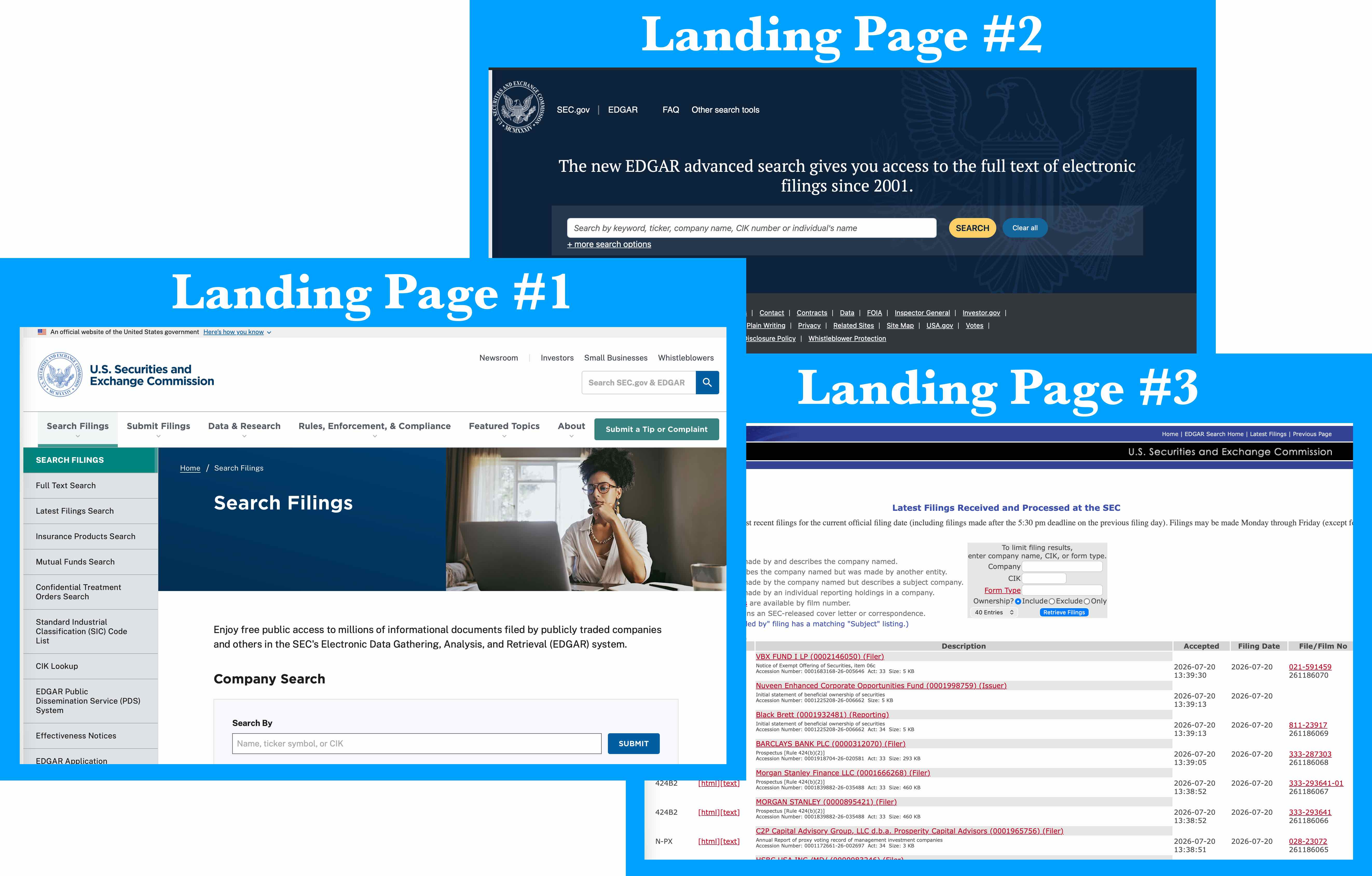
For most of my work, I choose to use the older system, with access to documents back to the early 90s. The online access to old documents is great, but it raises a second problem. After a user searches for a company, a table of documents is returned. If the user finds their document in the table, visits another website and then returns to the SEC site, their position in the table is cleared and they need to find the original document all over again. For high-volume document searching, this makes the website almost unusable.
Finally, there is no good way to bulk download any set of documents a user might want. Frankly, although it is possible, there is no decent way to download even a single document.
Off-the-shelf software is good, but costly
OK, enough ragging on the SEC for a moment. Others have run across these and other problems in the past, and so, there exist several software front-end applications that allow users to search EDGAR filings in a friendly way.
The website BamSEC is the best of the bunch. It offers the kind of functionality a user would want to see:
Useful search functionality with autocomplete and autosuggest: search “Cost” and “Costco Wholesale Corporation” appears.
Filings split out and categorized based on what they contain: 10-Ks and 10-Qs for financial data, 8-Ks for timely company news and disclosures, Form 4s and others for insider transactions, etc.
A well-designed and easy to use interface
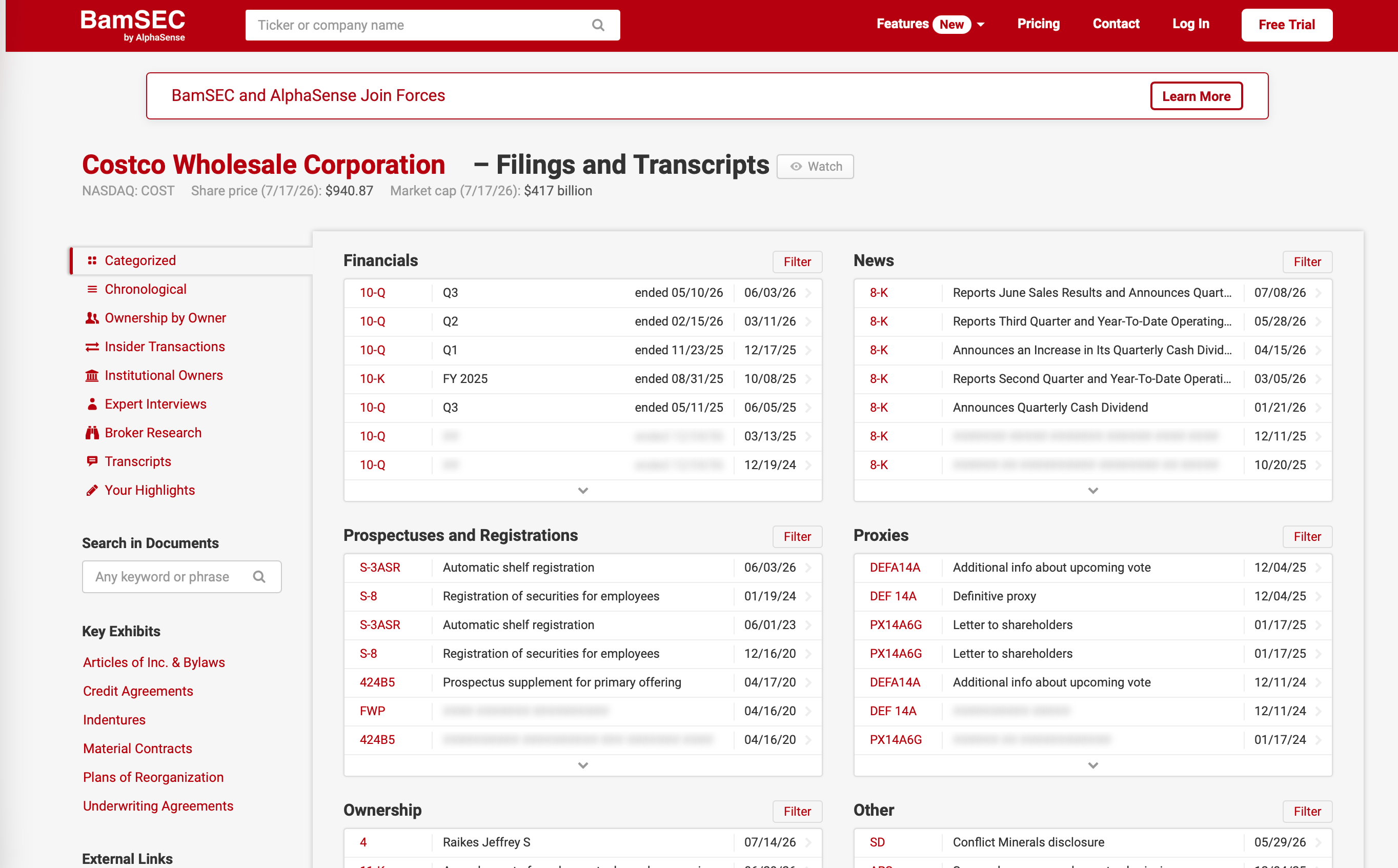
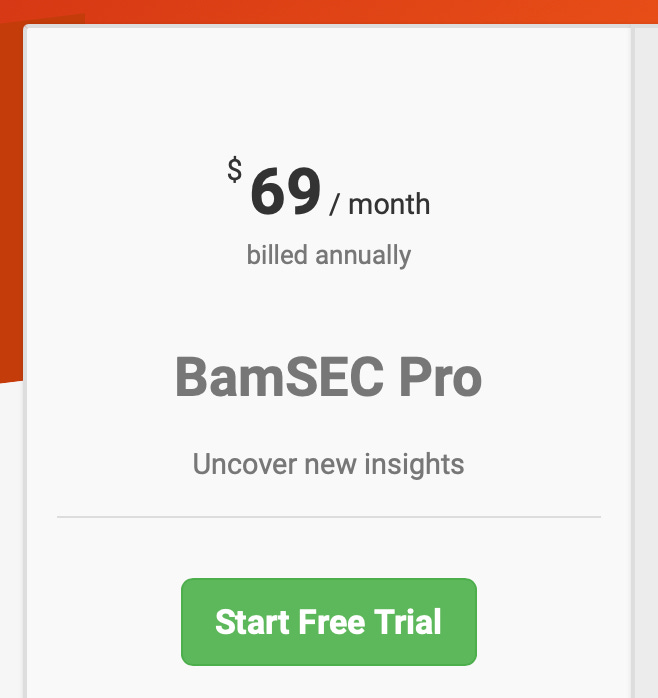
Unfortunately, BamSEC provides only a limited amount of its functionality for free. If a user wants to access more than roughly the past five documents in any given category, he or she can only do so with a Pro plan, which comes at the price of $69 per month.
My own EDGAR Explorer solves these problems
So, after suffering under the yoke of a clumsy government website and moderate annoyance at the thought of paying $70 per month to access public documents, I decided to build my own front-end for EDGAR. It was a pretty simple process, and the results were better than I imagined they would be.
I started by using Anthropic’s Claude suite of applications and accompanying models via the Claude desktop app on my iMac Pro. I selected Claude Code and chose a folder on my Mac that I wanted Claude to work from. At the time I created the application, I was using Opus 4.7. My first prompt was a simple description of what I wanted to create:
I want to build an application that simplifies the SEC Edgar database. Basically, I want to be able to type the name of the company and be able to download specific types of its documents and have them appear in an organized fashion.
After that, Claude prompted me with a few additional questions, which I answered.
What kind of application do you want to build?
Web app (Recommended)
Which document types matter most to you?
Ownership statements, 10-K (Annual reports), 10-Q (Quarterly reports), 8-K (Current reports), Proxy statements (DEF 14A)
I gave it permission to run commands on my computer to create the software. After what was probably 10 to 20 minutes, it returned a successful first version of the web application, written in TypeScript with React library (neither of which I have coding experience with), and it told me the few simple steps I needed to take to run the application and see the results.
Pretty amazing. Claude had created 23 files and a moderately functional front-end application for the EDGAR database.
After that first version was created, I probably spent an additional four or five hours of time over a few days prompting Claude to create additional features, fine tune some design, and fix some minor bugs it inadvertently created. Claude tells me that I prompted it 48 times in total, and the model output approximately 40,000 tokens in prose responses to my prompts and another roughly 30,000 tokens worth of actual code.
For the most part, the application was functional right from the start. Claude got only a few things wrong, and they all seemed to be at the level of what a conscientious human developer might also miss. For example, I pointed out that one of the first versions of the app only returned filings back through 2015. Claude responded that documents beyond the first 1,000 are referenced in a separate SEC data file, and it fixed the issue. There were other quirks too, like file count totals not being correct when the user applied a filter, and Claude had little problem fixing them after I pointed them out.
The end result, as it exists today, is a truly useful piece of software, screenshotted below.
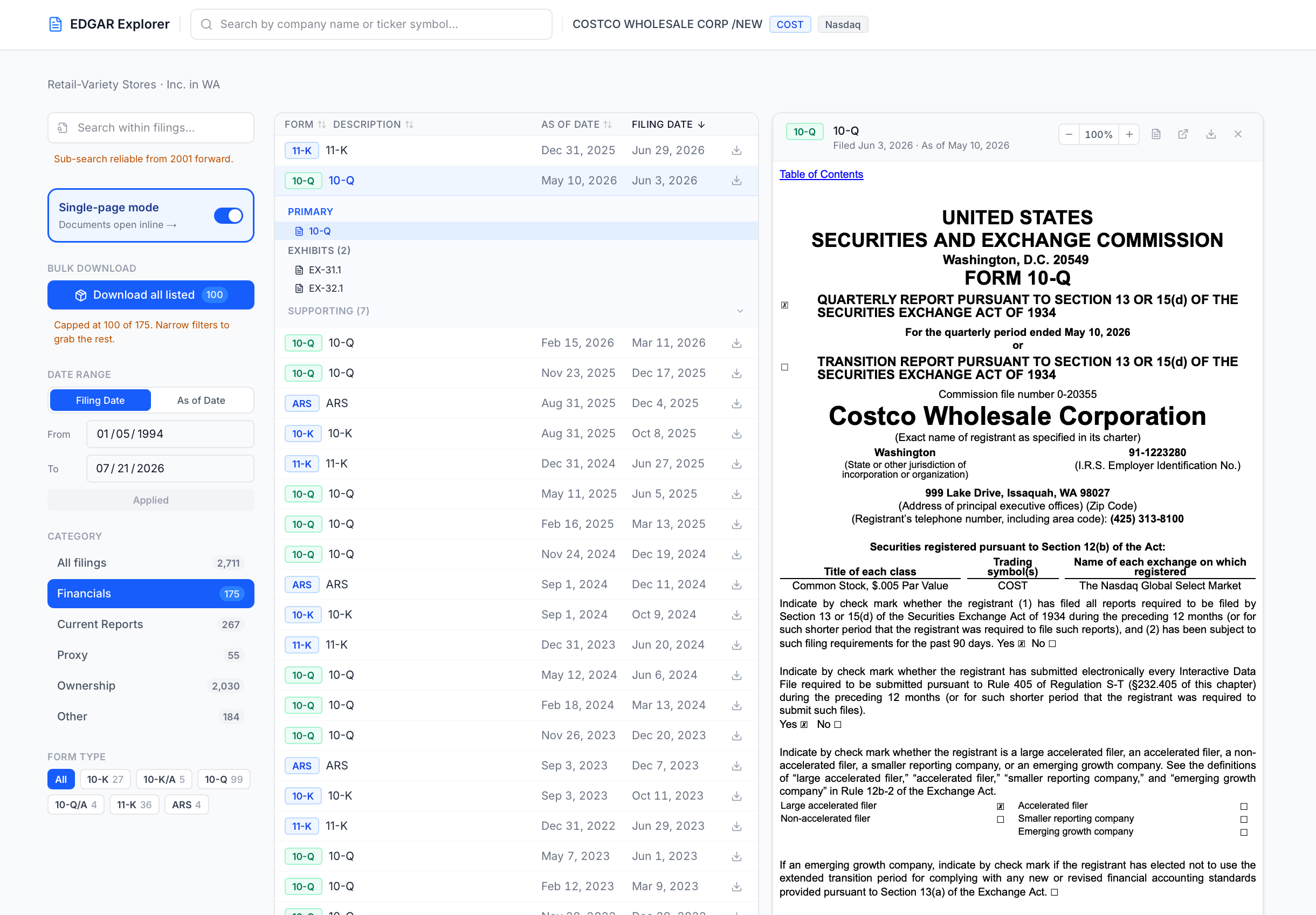
The “EDGAR Explorer” is a functional web application with some great features:
autocomplete and autosuggest search functionality,
the option to show all the filings from a company at once or as one of five categorized subsets,
the full history of SEC electronic filings (in the case of Costco, back to 1994),
the ability to narrow the search by filing date or “as of” date,
search capability within filings themselves,
bulk download capability, and my favorite,
“single page mode”, which allows you to select a filing and read it all in the same web page. No more jumping from browser tab to browser tab.
I use the application several times a week, doing things like bulk downloading documents for case studies that I’m writing or quickly finding the latest financial filings, earnings presentations, or other documents for any public company I’m doing some research on. For a total investment of about five hours of my time, it’s amazing how well the software works and how useful it is for me. I also can’t emphasize enough how enjoyable the software is to use since I “built” it and set the features just the way I want. And anytime I’m stymied by some feature, I can ask Claude to adjust it.
Other applications
As I mentioned above, I also created three other simple applications to assist my investing work.
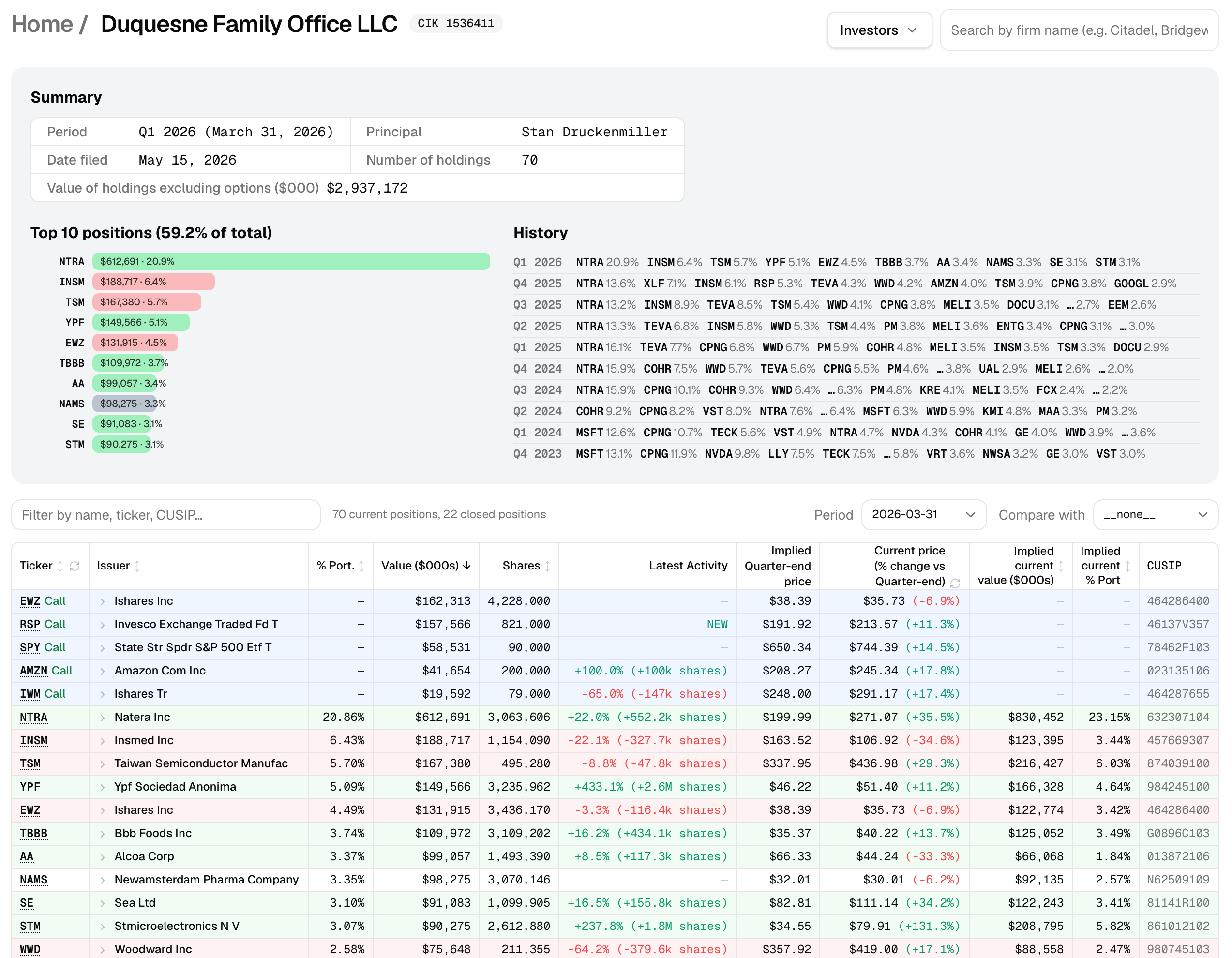
A Form 13F viewer to see the holdings of various investment firms
This one was fun to build. Investment firms with over $100mn in Section 13(f) securities under discretionary management need to file a Form 13F every quarter with the SEC. The forms can be good sources of investment ideas; I especially enjoy finding companies I’m unfamiliar with in the portfolios of investors I admire. (There is a big caveat with “cloning” the ideas of other investors. Too many investors will ride the coattails of their heroes without doing the work themselves. Do your own work, and resist the urge to follow blindly.)
There are plenty of websites and applications (paid and free) that follow these filings, and some of them are good, but just about all of the free websites out there clutter the page with advertising, some to the point of crippling their utility. In addition, many of the sites report options holdings incorrectly, displaying the nominal value of the options instead of an estimated market value (or instead of simply flagging the nominal value as not comparable to the value of outright stock holdings).
Because 13F information is public, with just a few hours of prompting Claude, I was able to create a better 13F viewer that has no ads, segregates option holdings (to better see top equity holdings without miscalculation), and adds a few additional features too, like showing other investment firms that hold the same stock and showing how much a given stock is up or down in price since the filing was made.
A portfolio tracker
I manage my own personal investment portfolio alongside those of some family members. There are both personal accounts and retirement accounts to manage. Over the years, as more accounts were added and life events happened, there are some accounts with one online brokerage and some with another. In the past, I would track the holdings in each account with a spreadsheet. When I wanted to make a new investment, I would need to spend 30 to 60 minutes deciding what, if anything, to sell, which accounts to place the trades in, and I would need to create and monitor a checklist of each trade to be executed.
There is, of course, software to help with this problem. Also, I could solve part of the problem by transferring all the accounts to Interactive Brokers, which offers the ability to unify trading by prorating any trades across “client” accounts. I’ve used that in the past, and I’ll probably use it again in the future. To date, I’ve treated this management somewhat informally, so I haven’t used a third-party software solution or taken the time to transfer the accounts to a single broker.
I was having so much fun developing other software with Claude, however, that I took a few hours to create a unified portfolio tracker that shows me everyone’s account holdings in one place. When I want to make an investment, the app can suggest how much cash I have to use in each account and how much of another investment I need to sell, all based on some rules I provide. The app is like a streamlined and supercharged version of the old spreadsheet I was using before. Also, I can adjust the app at any time to suit a new feature or presentation, something not possible with off-the-shelf solutions.
An investment ideas tracker
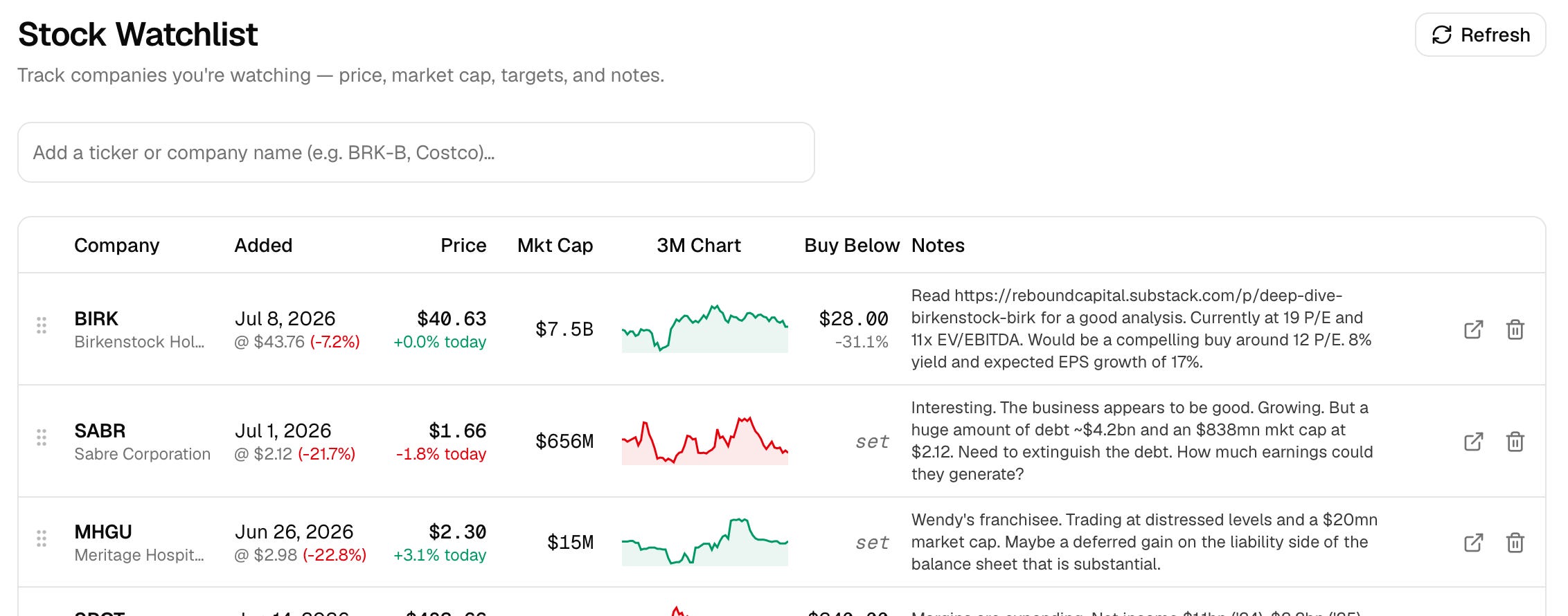
I created this last one almost purely for fun. It’s a simple web app that lets me track any stocks that I may be interested in doing more work on or in reevaluating later if the price declines. I can enter a stock ticker, a target price, and some notes, and the app simply keeps the list for me. I run across potential ideas for research all the time, and this app is a brain dump of sorts.
Now, there is no feature in this particular app that cannot be had with an off-the-shelf version or with a simple spreadsheet, but there are two things I think are important: self-ownership and malleability.
First, by creating and owning the work, I tend to feel much more invested in and excited about revisiting a growing list of ideas than if they were typed into (yet another) spreadsheet.
Second, I envision all four of these small apps I’ve created ultimately living in one personal webpage or application. That app will become a go-to piece of software I fire up whenever I’m doing investing work, and that makes the work more enjoyable and less burdensome than if, each time, I needed to recall where I stored my idea tracking spreadsheet before opening it. Ditto for the SEC EDGAR webpage, the right 13F tracking webpage, and my portfolio tracker spreadsheet. By creating all of these and storing them in one “place”, I’ve reduced the mental burden of recalling how and where I store my work.
Remote use
What about deploying the software for use when I’m not at my desktop computer? I have a version of the app deployed at my personal website, so I can access it whenever I want. Alternatively, there are web hosting services, like Vercel, that will host your software for free with limits. There are some steps to take to deploy an app to Vercel, but Claude walked me through it quickly and easily.
If you’ve made it this far and would like to try the application, you can do so by visiting EDGAR Explorer on Vercel. I’ll keep the link live as long as I don’t get any warnings about high usage.
Personalized software
The age of personalized software for non-software-developers is here, at least for relatively simple applications like the one I described above and the other simple applications I’ve vibe coded over the past year. If there are any software applications that you currently use but that are not quite right or that simply don’t exist in the way you wish, today’s LLMs are more than capable enough to build simple (and even relatively complex), personal applications in very short periods of time. Consider putting some time aside over a weekend to experiment.
The applications that should prove most promising are those for which data is public, like SEC EDGAR data, or personal, like a more personal task management app or customized dieting app. (There are public databases that tabulate the macronutrient and calorie counts for thousands of foods.)
Think about things you use your smartphone, tablet, or computer for today that could be app-ified. Any notes you take using your smartphone may be a good place to start. Maybe you have a brain dump of notes on your phone. Maybe you record stats for a sport you or your children play in a note on your phone. Either of these could be good candidates for a personal app that can make the recording more fun and, in the case of statistics, dynamically show you the trends. What about your work? Do you send information or analysis to clients using third-party software? Would it be useful to have some of your own custom ideas added or even your own branding?
Developing a simple piece of software may be a good way to start using the information you’re recording or getting some more business or a leg up at work.
One investing takeaway
Finally, there is one important takeaway as it relates directly to investing here.
For a long-term investor interested in investing in software companies, I think it is useful to group them into one of two types. Within the first type are those companies that provide something that the LLMs can also provide, something akin to judgment or intelligence, software development included, with the LLMs increasingly providing it at a fraction of the cost.
It was so easy for me to create my own front-end EDGAR software. One result is that I was able to save the $69 a month that I would otherwise have paid to BamSEC. Pieces of software that charge their users simply for great user interfaces should have a tough time from here on out. I’ve cited BamSEC here, but some others spring to mind as well.
Within the second type are those companies that provide something the LLMs cannot provide, like proprietary data, access to a network, social or otherwise, human judgment, and potentially something like taste or curation.
Some examples spring to mind in this category, like social networks (Reddit) or similar (Roblox) and financial network or data providers (CME Group, Intercontinental Exchange, Tradeweb, MarketAxess).
Many publicly-traded software companies have been crushed in the past year on exactly the concerns I mentioned, particularly those in the type-1 bucket, while those in the type-2 bucket are not down in price nearly as much. So my commentary here is not particularly new or revealing.
What’s more, no investment can be assessed without considering its price. A simple classification of companies into type 1 or type 2 is not, in and of itself, a judgment on the potential of any of these companies as investments. For that, price must be taken into account. Almost certainly, there are some type-1 companies that will be much better investments at current prices than some type-2 companies.
However, actually creating my own software and deploying it showed me up close just how easy it is for anyone to mimic many existing software solutions currently available at a fraction of the cost and with extreme customizability, and the ease of doing this should only become greater as these models rapidly get better. If you find yourself tempted to invest in a type-1 company and you’re dismissing the potential for the company to lose subscription revenue, I would at least urge you to consider a more precise thesis. Why will this particular company, X, keep its revenue base if its software can be duplicated easily? Does it provide something that obviously cannot be replicated with an LLM?
As I said, there may be software type-1 companies that are great investments from here on out because they are priced too low today. But remember the punch-card philosophy of Buffett: the best investments are not those that merely appear cheap, but those so obviously compelling that they merit one of the hypothetical twenty investments you get over your entire life.
For the vast majority of people, it doesn’t really matter which platform, model, or coding wrapper/harness you use. What matters most is to experiment. When I first began vibe coding, I was using Google AI Studio, and I thought it was incredible. Then, a friend suggested I switch to Claude Code, which had some better capabilities with Anthropic’s latest model at the time. Tools like Cursor and Lovable have moved in and out of popularity, and I’ve used OpenAI’s Codex harness too, and it’s great. I have stopped obsessing about finding the greatest tools, opting mainly to pick one and make some progress using it.
good your idea for edgard.
AI is a help...for who already know how thing goes... and need to be more free,to do others thing,more works... or to live...
Actually,like every wall street fable,is a bubble that it's near to explode but in the meantime transfer money from a black hole to AI,chip,datacenter,memory,etc...
your dynamic AI will change,now they need to convert the masses to pay for services ...
to become more dependent ...
in the meantime warren buffet hold forewer(buy and hold) ..and our life is spent on ? follow their trends ?
they exterminate by mrna and wars in EU and gaza...see japan blood ... next time ? what in the name of stock options ? the black hole is more bigger ...